Every January I open Canva, type “vision board”, and lose an hour scrolling templates. Last year I picked a gorgeous one with 24 photo slots, filled it with whatever looked nice, and by March I couldn’t remember which picture stood for which goal. The layout decided my goals instead of the other way round. What I needed was a vision board template that matched how many goals I actually had and where the board would live: on my wall, on my phone or on my desk.

So I went looking for templates that come both ways, editable and printable, and this is the one I found first. It’s a Canva board in two sizes, one for screens and one at 11 x 8.5 inches to print at home, plus blank PDFs if you’d rather glue photos by hand.
01 / Best overall
Vision Board Editable and Printable
Designed by Happy Sewing Time.
 Best for print or screen
- Canva + PDF
- 11 x 8.5 in
- 1920 x 1080 px
What’s insideA ZIP with 3 PDFs: the board in two sizes, 1920 x 1080 px for screens and 11 x 8.5 inches to print at home, plus a PDF with instructions and the Canva links. Edit colors, fonts and photos in Canva without Canva Pro, or print the board and add your own photos and notes by hand.
- Canva + printable PDFs
- Screen and Letter sizes
- No Canva Pro needed
- Instructions included
Why I picked it
One design covers the wall and the computer, and the printable PDF works even if you never open Canva.
Keep in mind: the listing still mentions 2023, so change any year text when you edit.
Layout matters as much as format, though. A grid keeps goals separate, a collage feels like a mood, a worksheet makes you write the goal down, and a bingo card turns the year into a game. So I kept looking, and here are my other finds. After the list I explain each layout type, sizes for wall, desk and phone, and how to set a template up in five steps.
The 10 Best Vision Board Templates I Found
I skipped KDP planner interiors, 120-page “vision board” books, dated 2021 to 2025 boards you can’t edit, and clipart sets (those are on my list of vision board pictures to print). Every pick here is a layout you fill with your own goals and photos. Two designers appear twice. For full kits with prompts and cut-outs, see my vision board printables list.
In short: printable sheets if you want to write and glue tonight, Canva layouts if you want to edit first and print after, and screen formats if your board lives on a desktop or phone.

Find your favorite
Quick Picks
Choose a template to jump to its review.
- 01Best overallVision Board Editable and Printable
- 02Best gridBingo Vision Board Template
- 03Best playfulNetflix Style Vision Board Canva
- 04Best collageTilted Polaroid Photo Collage Template
- 05Best worksheetVision Board Tracker
- 06Best compactVision Board
- 07Best heart collageCute Aesthetic Vision Board Template
- 08Best for desktopSelf- Care Vision Board | Canva Template
- 09Best PhotoshopMood & Vision Board Template
- 10Best for kidsKids Vision Board Printable Template
How I chose: a clear layout first (grid, collage, worksheet, bingo), then whether you can print it, edit it or both, the sizes included, and how much room it leaves for written goals. Evidence: product pages on Creative Fabrica, checked on November 22, 2026. I haven’t printed these myself, so I describe what each designer lists and shows in the previews.
02 / Best grid
Bingo Vision Board Template
Designed by Precious Pixel Pals.
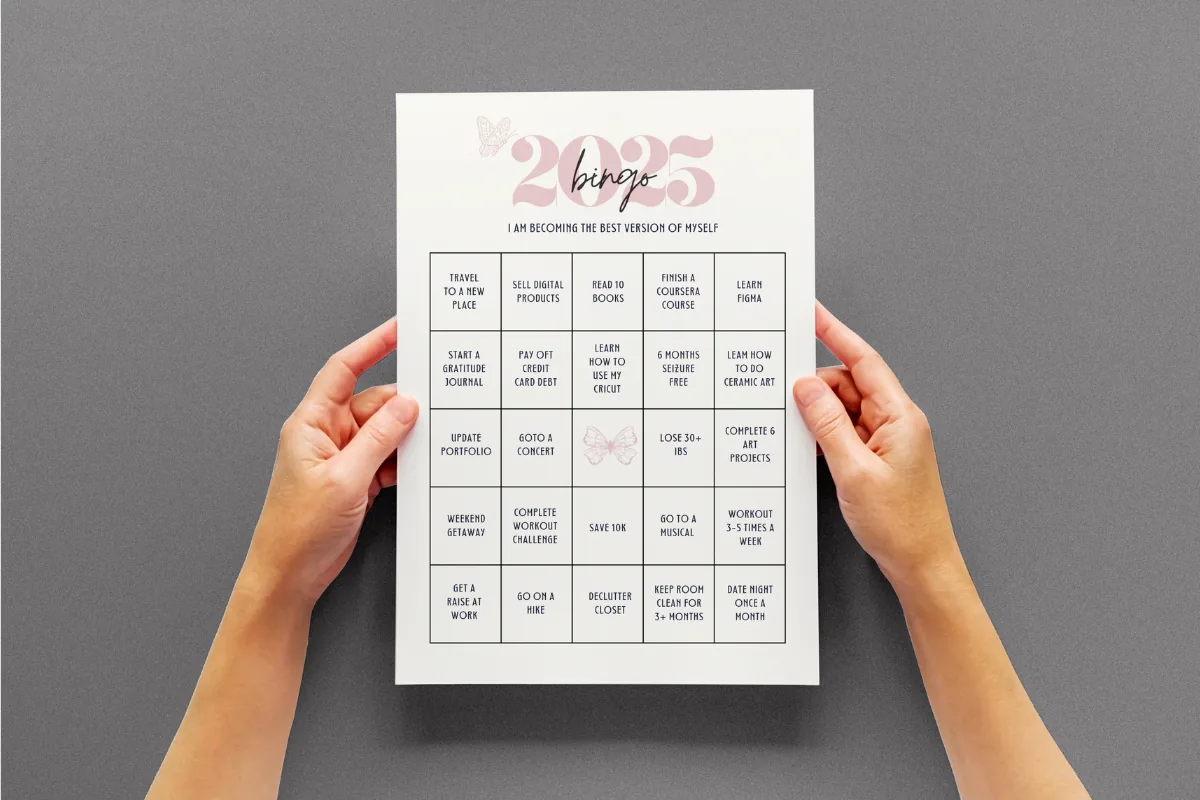 Best for a bingo goal card
- Canva
- 10 sizes
- Video guide
What’s insideA bingo-style vision board grid in Canva with 10 template sizes, from 8 x 10 inches and A4 up to 24 x 36 inches and A1, plus a video showing how to edit it with a basic Canva account.
- Bingo goal grid
- 10 sizes, A4 to 24 x 36
- Video edit guide
- Editable in Canva
Why I picked it
A bingo card turns a year of small goals into something you want to cross off, and the poster sizes suit a wall.
Keep in mind: the preview shows 2025, so change the year before you print.
03 / Best playful
Netflix Style Vision Board Canva
Designed by Precious Pixel Pals.
 Best for a streaming-style board
- Canva
- 5 designs
- 10 sizes
What’s insideFive streaming-app-style vision board designs in Canva with rows of photo tiles, each in 10 sizes from 8 x 10 inches and A4 to 24 x 36 inches, with a video on editing in Canva.
- 5 designs
- 10 sizes
- Photo tile rows
- Video edit guide
Why I picked it
It’s the most fun layout I found, and rows of tiles make it easy to group pictures by goal.
Keep in mind: the dark backgrounds use a lot of ink, so it’s better on a screen or printed at a shop.
04 / Best collage
Tilted Polaroid Photo Collage Template
Designed by vasyako1984.
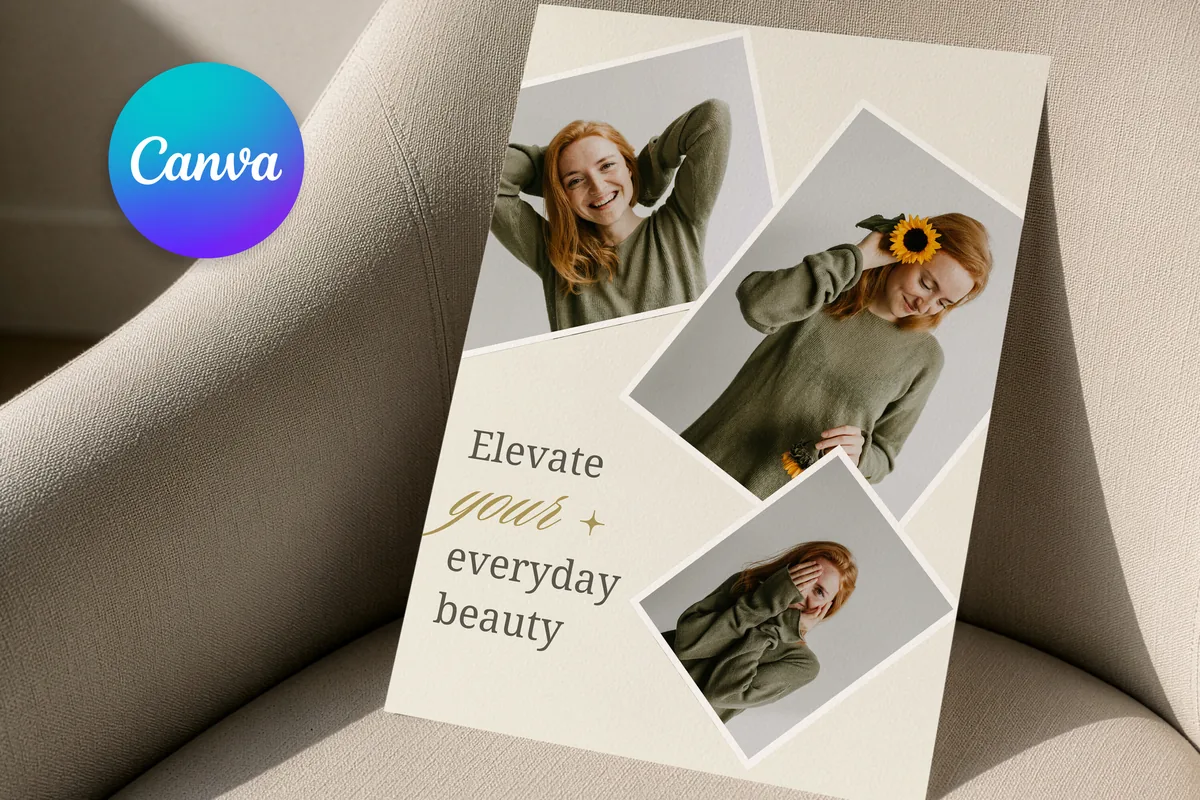 Best for a candid photo collage
- Canva
- 5 x 7 to 24 x 36
- A3 to A1
What’s insideA Canva photo collage with tilted polaroid-style frames on a soft cream and sage background, in 5 x 7, 11 x 14, 16 x 20, 18 x 24 and 24 x 36 inch versions and A3 (printable at A4 to A1), delivered as a PDF of Canva links.
- Tilted photo frames
- Sizes 5 x 7 to 24 x 36
- A3 to A1 ratios
- Editable text and colors
Why I picked it
The tilted frames look like snapshots on a wall, which suits a board about how you want the year to feel.
Keep in mind: it’s sold as a photo collage, so goal labels are up to you.
05 / Best worksheet
Vision Board Tracker
Designed by Realtor Templates.
 Best for goals plus things to try
- A4
- 5 colors
What’s insideA printable vision board planner page in A4 with sections for physical, mental and spiritual goals, things to try and notes, in 5 color variants.
- One-page worksheet
- Physical, mental, spiritual
- Things to try box
- 5 color variants
Why I picked it
It makes you write goals in words, which is the part most collage boards skip.
Keep in mind: it’s A4 only and more of a goal worksheet than a picture board.
06 / Best compact
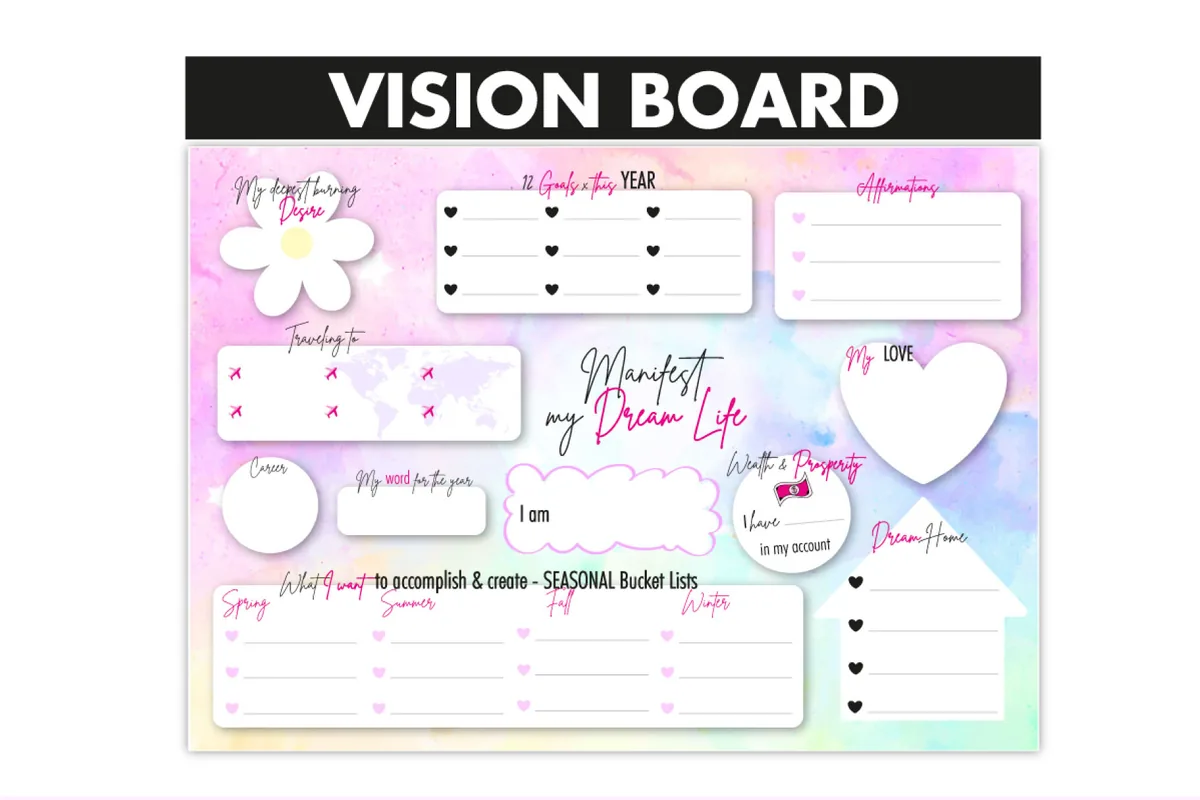
Vision Board
Designed by BixiBina.
 Best for a small desk board
- A4
- Pink + rainbow
What’s insideA compact vector vision board as an A4 PDF in two versions, pink and rainbow, that also prints on Letter; the preview shows boxes for goals this year, travel, love, a word for the year and seasonal bucket lists.
- 2 color versions
- A4, prints on Letter
- Goals, travel, word boxes
- Vector file
Why I picked it
Everything fits on one sheet you can tape above a desk, with a place for your word of the year.
Keep in mind: the boxes are small, so it’s a written board more than a picture board.
07 / Best heart collage
Cute Aesthetic Vision Board Template
Designed by Templates by amleyy.
 Best for a heart-shaped collage
- Canva
- PNG
- Editable
What’s insideOne vision board template in Canva with a heart-shaped photo collage, soft colors and playful details, delivered as a PNG and a PDF with the Canva link; drag in your own pictures and words, then print it or save it as a wallpaper.
- Heart photo collage
- Editable in Canva
- PNG included
- Print or wallpaper
Why I picked it
The heart shape gives a collage a clear outline, so even 30 small photos look intentional.
Keep in mind: the preview spells out twenty twenty six, so update the year to 2027.
08 / Best for desktop
Self- Care Vision Board | Canva Template
Designed by Sharp Flair Graphics.
 Best for a desktop wallpaper board
- Canva
- 1920 x 1080 px
- 6 pages
What’s insideSix pages in Canva: a sample self-care vision board, an editable template, 2 reflection question sheets and 2 blank reflection sheets, sized 1920 x 1080 px for a desktop wallpaper; you can also download a PDF from Canva to print.
- Sample + template
- 2 reflection question sheets
- 1920 x 1080 desktop
- PDF download from Canva
Why I picked it
The reflection sheets ask why each goal matters before you pick pictures for it.
Keep in mind: it’s sized for a screen, so a print comes out landscape and wide.
09 / Best Photoshop
Mood & Vision Board Template
Designed by daphnepopuliers.
 Best if you edit in Photoshop
- PSD
- 8 x 8 in
- 300 dpi
What’s insideA layered Photoshop PSD mood board at 8 x 8 inches and 300 dpi with 8 photo masks, 5 color boxes and editable text, plus the font files and the 2 demo boards as JPEG.
- 8 photo masks
- 5 color boxes
- 8 x 8 in, 300 dpi
- Fonts included
Why I picked it
Photo masks crop your pictures into the layout automatically, and the color boxes set one palette for the board.
Keep in mind: you need Photoshop, and the file dates from 2019.
10 / Best for kids
Kids Vision Board Printable Template
Designed by Gfx Shaown.
 Best for a child’s first board
- Canva
- PDF, PNG, JPG
- SVG
What’s insideA kids vision board template in Canva with doodle frames for dreams, goals and favorite things; download it as PNG, SVG, JPG or PDF to print and color, or cut on Cricut or Silhouette. The preview shows several page designs.
- Doodle frames to color
- Canva template
- PNG, SVG, JPG, PDF
- Classroom friendly
Why I picked it
Kids can draw in the frames instead of hunting for photos, so it works as a class or kitchen-table activity.
Keep in mind: the preview says 2026, and some elements in the template need Canva Pro.
Quick Comparison
| Product | Layout | What’s inside | Sizes/format | Standout |
|---|---|---|---|---|
| 1. Editable and Printable | Photo collage | 2 boards + Canva links | 11 x 8.5 in, 1920 x 1080 | Print or screen |
| 2. Bingo Board | Bingo grid | 1 layout, 10 sizes | Canva, A4 to 24 x 36 | Goal game |
| 3. Streaming Style | Photo rows | 5 designs, 10 sizes | Canva | Most playful |
| 4. Tilted Polaroid | Freeform collage | 1 collage, 6 sizes | Canva, 5 x 7 to 24 x 36 | Poster sizes |
| 5. Vision Board Tracker | Worksheet | Goal areas + notes | A4 PDF | 5 colors |
| 6. Compact Board | Mixed boxes | Pink + rainbow | A4 PDF | Desk size |
| 7. Cute Heart Collage | Heart collage | 1 template | Canva + PNG | Heart shape |
| 8. Self-Care Board | Desktop collage | 6 pages incl. reflection | 1920 x 1080 | Reflection sheets |
| 9. Mood Board PSD | Photo masks | 8 masks, 5 color boxes | PSD, 8 x 8 in | Photoshop |
| 10. Kids Vision Board | Doodle worksheet | Kid layouts | Canva, PDF, PNG | For children |
Printable Sheets, Canva Layouts or Screen Boards: Which Vision Board Template Fits You
Printable Sheets
Picks 5, 6 and 10 are pages you print and fill in by hand. They suit you if writing the goal matters more than the photos. Skip them if you want a big wall collage; Letter and A4 sheets are small.
Canva Layouts to Print
Picks 1, 2, 4 and 7 open in Canva, where you drop in photos and words, then download a PDF to print. They’re the most flexible group. You’ll need a Canva account, and big poster sizes need a print shop.
Screen and Pro Formats
Pick 8 is sized as a desktop wallpaper, pick 3 is a photo-heavy layout with dark backgrounds that looks best on a screen, and pick 9 is a Photoshop file. Skip this group if you don’t want to edit on a computer.
Vision Board Layout Types Explained
Most templates use one of a handful of layouts. A grid is good for clear categories and tracking, and a freeform collage suits creative boards (PicCollage). Here’s how I’d match each one to a reader.
| Layout | What it looks like | Best for | Picks |
|---|---|---|---|
| Grid | Equal boxes, one goal per box | Clear goals you want to track | 2, 5 |
| Collage | Overlapping photos, no fixed boxes | A mood or feeling for the year | 1, 4, 7 |
| Worksheet | Small image boxes plus writing lines | People who think in words | 5, 6, 10 |
| Life-area wheel | A circle split into areas | Checking balance across your life | None here; draw it in the center of a grid |
| Quadrant | Four big boxes, one per area | Four main goals | Any grid, merged |
| Center word | One word of the year in the middle | A theme rather than a list | 1, 4 |
| Bingo | A card of small goals in squares | Lots of small, fun goals | 2 |
| Screen board | Wallpaper sized for a monitor or phone | Seeing it every day on a device | 3, 8 |
The life-area wheel comes from the Wheel of Life coaching tool, which Paul J. Meyer created in the 1960s; you rate each area from 1 to 10 (BetterUp). It works well as the middle of a grid board: rate first, then put pictures around the lowest scores.
Vision Board Template Sizes for Wall, Desk and Phone
- Desk or binder: US Letter (8.5 x 11 in) or A4 (210 x 297 mm), printed at home (paper sizes).
- Wall: 16 x 20 to 24 x 36 inches, printed at a shop from a Canva template like pick 2 or pick 4.
- Desktop: 1920 x 1080 pixels, like picks 1 and 8.
- Phone: a tall wallpaper size; an iPhone 16 screen is 2556 x 1179 pixels (Apple), so resize a Canva design to a phone wallpaper before you save it.
Design at the size you’ll print. Making a board at screen size and printing it on Letter crops the edges or leaves white bands.
How to Set Up a Vision Board Template in 5 Steps
- Count your goals first. Three to five is plenty. A goal planner printable helps you get from a wish list to a short list.
- Pick a layout with the same number of spaces. Four goals, four boxes. A template with 24 slots invites filler pictures.
- Decide where it lives. Wall, desk or phone sets the size; check the size list above before you edit.
- Fill it in. One picture and one written line per goal: an amount, a date or a place. My 2027 vision board ideas list has lines to borrow.
- Add one next step to each box. “Open the savings account” or “book the first lesson”. A board with next steps is a board you work from.
Skip the template entirely if you love cutting from magazines; a blank poster board and glue give you more freedom than any layout.
What I Look For in a Vision Board Template
- The right number of spaces. As many boxes as you have goals, plus one for a word of the year.
- Room to write. At least one line per goal, not only photo frames.
- Print and edit options. A Canva link plus a PDF covers both.
- Your size. Letter or A4 for a desk, poster sizes for a wall, wallpaper sizes for screens.
- Ink-friendly backgrounds. Light backgrounds if you print at home.
- Red flags in a listing: “KDP interior”, “120 pages”, “ready to upload to Amazon” or a year you can’t change usually mean it isn’t a board for you.
Printable vs Digital Vision Board Template
- Printable: you see it on the wall without opening an app, and filling it in by hand makes you slow down and choose.
- Digital: easy to change, and a phone wallpaper goes everywhere with you.
- Both: make it once in Canva, print a copy for the wall and save a second as your wallpaper.
A New Year Vision Board Template Kit
- A printable board plus a screen version: pick 1.
- A bingo card for small fun goals: pick 2.
- A wall collage at poster size: pick 4.
- A goal worksheet for the desk: pick 5.
- A board for the kids at the same table: pick 10.
Vision Board Template Ideas
- A one-word board with your word of the year in the center.
- A four-box board for money, health, home and fun.
- A bingo card of small goals for the year.
- A quarterly board you redo every three months.
- A travel-only board with places and dates.
- A family board everyone adds one picture to.
- A before-and-after board for a room makeover.
- A phone wallpaper with your top three goals.
- A desk worksheet with goals and next steps.
- A reading board with the books you want to finish.
- A self-care board with reflection questions.
- A year in pixels page next to the board to track how the year feels.
How to Print a Vision Board Template
Home printing. Picks 5 and 6 are A4 PDFs; on US Letter paper choose “Fit” so nothing is cut, or print at 100% if your paper matches. Light cardstock keeps a desk board flat. For wall sizes, download a PDF from Canva at the size you need and print it at a copy shop.
Ink. Dark templates like pick 3 use a lot of ink. Print them at a shop or keep them on a screen.
Photos. For a printed collage, use photos at least 1200 x 1800 pixels for a 4 x 6 inch spot so they stay sharp. Print your own photos on matte paper if the board goes under glass.
Keep it in view. A board in a drawer does nothing. Pin the printout where you start your day, or put it in the front of the binder with your New Year’s resolution list.
Every template has a spot for words; fill it with one of these printable vision board words sets, from black and white quotes to watercolor cards.
Printing templates for a group? Our guide to a vision board making party covers counts per guest and the evening timeline.
A little help
Frequently asked questions
A few answers before you print.
What is a vision board template?
A ready-made layout for a vision board: boxes, frames or a collage you fill with your own photos, words and goals. Some are printable PDFs you complete by hand, others are Canva or Photoshop files you edit on a computer and then print or use as a wallpaper.
Sizes: Desk: Letter or A4 Wall: 16 x 20 to 24 x 36 in Desktop: 1920 x 1080 px
How do I make a vision board template?
Start with how many goals you have, then draw that many boxes on a Letter or A4 page, add a center spot for your word of the year and a line under each box for a written goal. In Canva, start from a blank page at your print size and use frames for photos.
What size should a vision board be?
Letter or A4 for a desk or binder, 16 x 20 to 24 x 36 inches for a wall, 1920 x 1080 pixels for a computer, and your phone’s wallpaper size for a lock screen. Design at the size you’ll print or display it.
Can I make a vision board template for my phone?
Yes. Make the board in Canva, resize it to a phone wallpaper, keep three to five pictures with the main goal in the middle, and save it as an image. Set it as your lock screen so you see it every time you pick up the phone.
Where can I create a vision board?
On paper with a printable template, in Canva with an editable template, in Photoshop with a PSD file, or on a whiteboard app. For most people Canva is the easiest, since one design can be printed for the wall and saved for the phone.
What is included in a vision board template?
Usually photo frames or boxes, spaces for words or affirmations, and sometimes category labels like health, money and travel. The more useful ones also leave room for a written goal and a next step under each picture.
Final Thoughts
If I were making a board this January, I’d use pick 1 in Canva for a printed wall copy and a desktop copy, and print the bingo card from pick 2 for small goals on the fridge. Count your goals first, choose a layout with the same number of spaces, and write one next step in every box before you hang it.