In September my card statement was $400 higher than I expected, and I couldn’t name a single big purchase. It was the small stuff: two paperbacks at the airport, a few takeout lunches, an app that renewed, a cab when it rained. None of it felt like spending while it was happening.

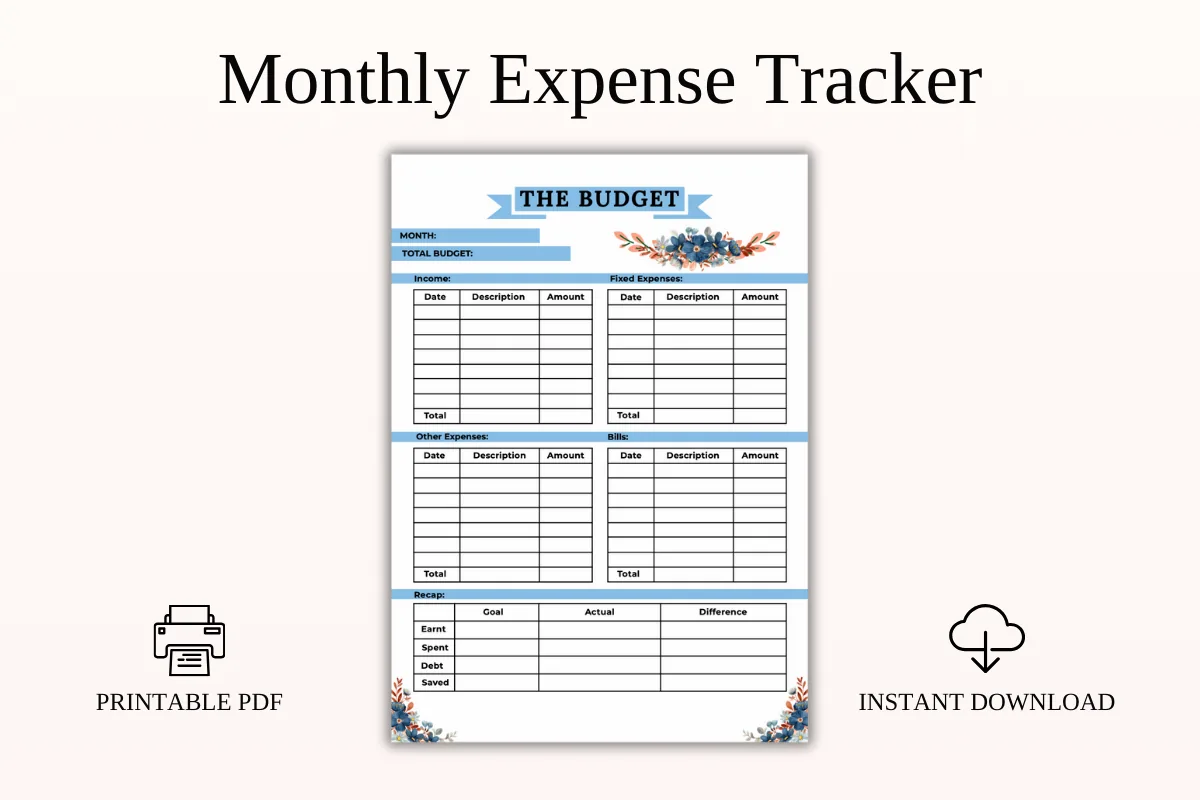
I’d tried budgeting apps before and stopped opening them after a week. So I went looking for an expense tracker printable, a page where every receipt gets a line, and this is the one I found first. It stopped me because the whole month fits on one sheet: income, fixed costs, other expenses and bills, then a small recap that compares what I planned with what I actually spent.
01 / Best overall
Easy Monthly Expense Tracker Printable
Designed by SpreadsheetsHub.
 Best for income, bills and a recap
- A4, A5, Letter, Half Letter
- Undated
What’s insideOne undated monthly page with sections for income, fixed expenses, other expenses and bills, plus a recap of earned, spent, debt and saved with goal, actual and difference columns.
- Income section
- Fixed and other expenses
- Bills list
- Goal vs actual recap
Why I picked it
It puts the whole month on one sheet: money in, money out, and a recap that shows the difference from your goal. That last box is what turns tracking into a decision.
Keep in mind: one page means limited rows if you log every coffee.
A monthly page shows the total, though, not the habit behind it. I also wanted a daily log that asks whether each purchase was a need or a want, a weekly page for the stretch between paydays, and something for the contract writing I do on the side. So I kept looking. Below is how to track a month, where most households’ money goes, and my other nine finds.
How to Track Expenses for One Month
The Consumer Financial Protection Bureau suggests filling out a spending tracker for at least two weeks, or even a month, to get a real picture of your habits. A month catches the bills that only come once. These steps follow that advice and the CFPB’s tip to separate needs and obligations from wants.

- Pick one place to write. One tracker, one pen, kept where you empty your bag or wallet at night.
- Log every purchase the same day. Date, what it was, amount and how you paid. Card, cash and app payments all count.
- Give each line a category. Housing, transportation, food, health, fun and so on. Keep the list short.
- Mark need or want. Rent, utilities and childcare are obligations; a gym you don’t use is a want. A simple N or W in the margin works.
- Total it at the end of the month. Add up each category, compare with what you earned, and circle the one that surprised you most.
Tracking doesn’t suit everyone the same way. If writing every coffee feels like punishment, track only cash and card spending outside fixed bills for a month; you’ll still find the leak.
Where the Money Usually Goes
US averages
Share of household spending, 2025
From the Bureau of Labor Statistics Consumer Expenditure Survey.

| Category | Share of spending |
|---|---|
| Housing | 33.9% |
| Transportation | 16.5% |
| Food | 13.0% |
| Personal insurance and pensions | 12.4% |
| Healthcare | 7.9% |
| Entertainment | 5.0% |
| Cash contributions | 2.7% |
| Apparel and services | 2.5% |
| Education | 1.9% |
Highlighted: the three biggest categories.
Your own month will look different; these are national averages.
The BLS reported average annual spending of $81,905 per household in 2025, up 4.3% from 2024. Food is where small purchases hide, which is why a master grocery list printable pairs well with an expense log, and the totals belong on your monthly budget printable.
The 10 Best Expense Tracker Printables I Found
I skipped book interiors of 100 pages and more, a 6 x 9 tracker that won’t sit in a binder and Excel-only templates. One designer had six expense trackers; I kept two. Each pick does a different job, from a daily log to a business year.
In short: start with the SpreadsheetsHub monthly page for the full picture, add the SpreadsheetsHub need-or-want log for the first month, and take the BKS Studio or designmela01 tracker if you have a side business.

Find your favorite
Quick Picks
Choose a tracker to jump to its review.
- 01Best overallEasy Monthly Expense Tracker Printable
- 02Best daily logSimple Expense Tracker Printable PDF
- 03Best monthly logMonthly Expense Tracker Printable
- 04Best weekly pageWeekly Expense Tracker Printable
- 05Best A5 insertIncome and Expense Tracker
- 06Best for a side hustleSide Hustle Expense Tracker – Printable
- 07Best business planner2027 Business Expense Tracker
- 08Best minimal insertExpense Tracker Insert Printable
- 09Best undated planner pageExpense Tracker
- 10Best in colorPrintable Spending Tracker Planner
How I chose. In order of weight: real tracking columns such as date, category, amount and payment method, or an income and recap section; a printable file with its size stated; one clear job, daily, weekly, monthly or business; and no repeats from my budget posts. Everything below comes from each product’s page on Creative Fabrica, checked on November 8, 2026. I haven’t printed these myself, so I describe what each designer lists and shows.
02 / Best daily log
Simple Expense Tracker Printable PDF
Designed by SpreadsheetsHub.
 Best for need-or-want tracking
- A4, A5, Letter, Half Letter
- Many rows
What’s insideA minimalist log with columns for date, purchase, expense type, cost, payment method and a need or want mark.
- Need or want column
- Payment method column
- Expense type
- Plenty of rows
Why I picked it
The need or want column is the one I’d use most. After a month, the circled wants show exactly where the money leaks.
Keep in mind: it has no totals section, so you add things up yourself.
03 / Best monthly log
Monthly Expense Tracker Printable
Designed by Mol Tazime.
 Best for a long month of entries
- PDF + PNG
- A4 + 8.5 x 11 in
- Undated
What’s insideAn undated monthly expense page with month tabs and columns for date, description, category and amount, plus space for notes or the payment method.
- Month tabs
- Category column
- Notes or payment method
- GoodNotes friendly
Why I picked it
A long single-column log with a category on every line is the simplest way to see a month’s pattern. The month tabs make it a page you can file and reuse.
Keep in mind: it’s very plain, with no summary or budget box.
04 / Best weekly page
Weekly Expense Tracker Printable
Designed by Mol Tazime.
 Best for a week at a glance
- PDF + PNG
- A4 + 8.5 x 11 in
- Undated
What’s insideAn undated weekly page with a box for each day and a weekly summary for start balance, income, expenses and end balance.
- Box per day
- Weekly summary
- Start and end balance
- Undated
Why I picked it
A week is short enough that you remember every purchase, and the summary box shows the end balance before payday.
Keep in mind: small daily boxes fill up fast on busy days.
05 / Best A5 insert
Income and Expense Tracker
Designed by Aneta Design.
 Best for an A5 planner
- PDF + PNG
- A5
- Cut lines
What’s insideA minimal A5 income and expense tracker insert, as 4 PNG files plus PDF versions with cut lines.
- A5 size
- Income and expense pages
- Cut lines
- Minimal style
Why I picked it
If your budget lives in an A5 ring planner, this one drops right in, and the cut lines make trimming easy.
Keep in mind: it’s A5 only, with no Letter file.
06 / Best for a side hustle
Side Hustle Expense Tracker – Printable
Designed by BKS Studio.
 Best for logging business costs
- Canva + PDF, PNG
- 8.5 x 11 in
- Editable
What’s insideA side hustle expense tracker with columns for date, item, purpose and amount, plus total expenses and notes, as PDF and PNG with an editable Canva link.
- Purpose column
- Total expenses
- Canva link
- 8.5 x 11 in
Why I picked it
The purpose column is the detail a side business needs: what you bought and why it was for the business.
Keep in mind: you need Canva to change the columns.
07 / Best business planner
2027 Business Expense Tracker
Designed by designmela01.
 Best for a full business year
- PDF + JPG
- 8.5 x 11 in
- 40 pages
What’s insideA 40-page 2027 business planner with a 12-month calendar, income source and monthly expense trackers, budget vs actual, expense categories, an annual summary, a top 10 expenses review and a tax preparation tracker.
- Monthly expense tracker
- Budget vs actual
- Tax preparation tracker
- Top 10 expenses review
Why I picked it
For a small business, the tax preparation page and the annual summary are what matter in April. It’s the only pick built around a full business year.
Keep in mind: it’s dated 2027 and the listing calls the files ready-to-upload, so it’s built partly for resellers.
08 / Best minimal insert
Expense Tracker Insert Printable
Designed by SHEThrivesMedia.
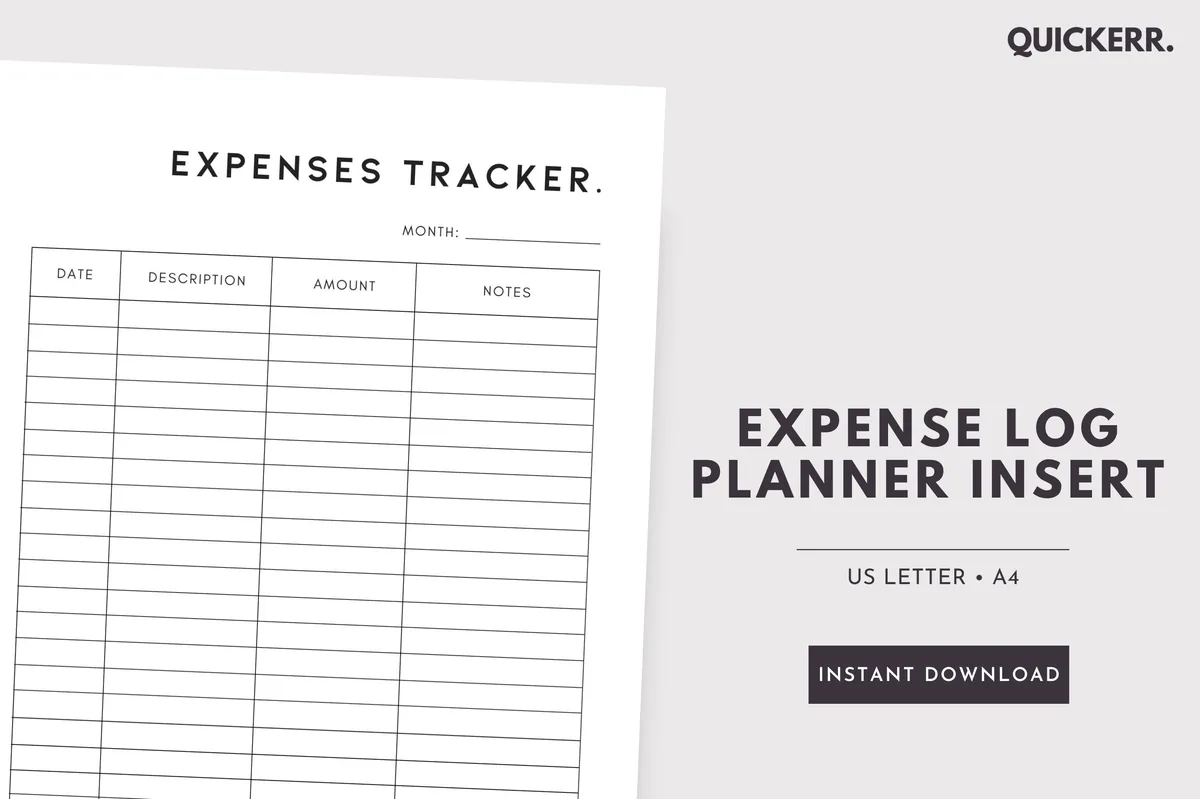 Best for a plain planner page
- A4 + US Letter
- 1 page
What’s insideOne undated expense log page with date, description, amount and notes columns, in A4 and US Letter, not editable.
- Date, description, amount
- Notes column
- Undated
- A4 and US Letter
Why I picked it
Four columns and nothing else, which is what a lot of people actually keep using. It has a matching income tracker sold separately.
Keep in mind: it’s a single page and not editable.
09 / Best undated planner page
Expense Tracker
Designed by floradigitaldesigns.
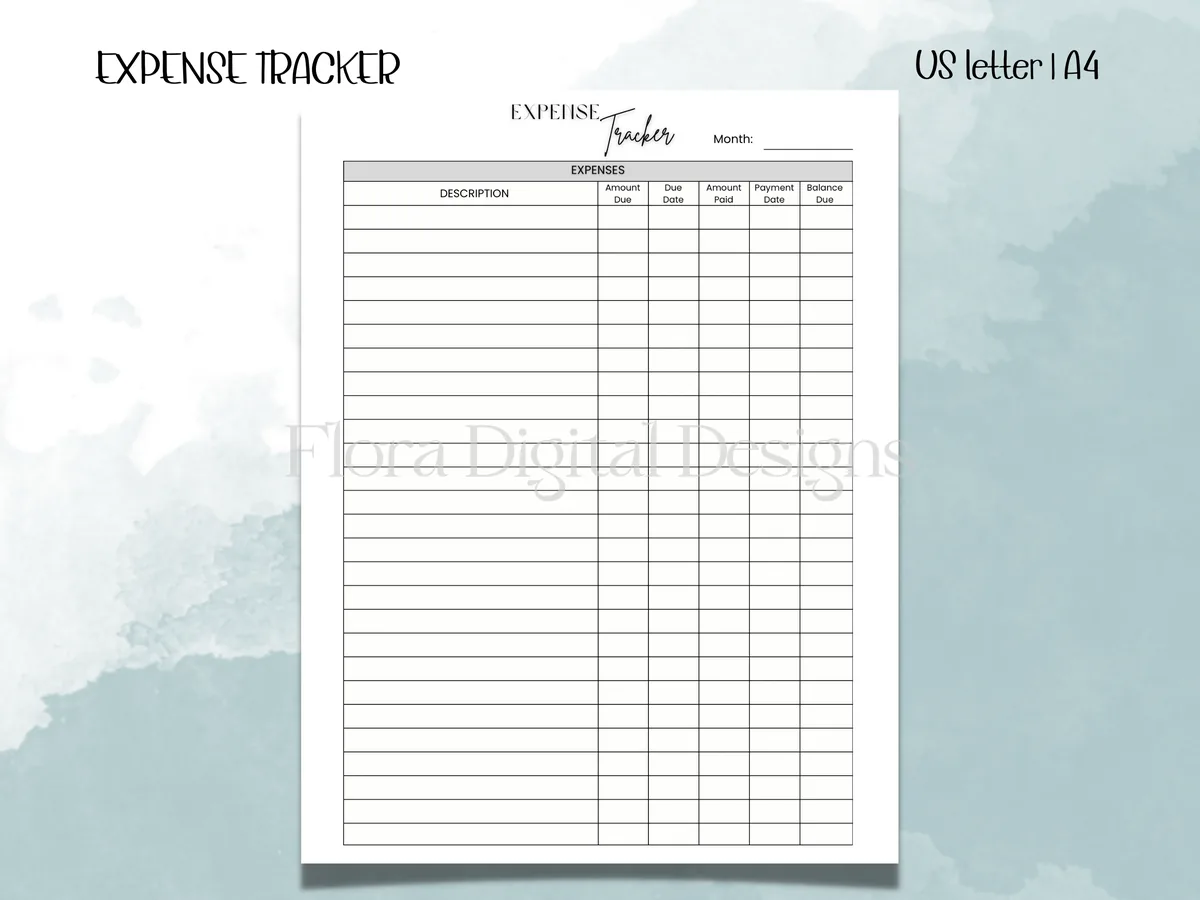 Best for a binder
- Letter + A4
- Undated
What’s insideAn undated expense tracker page in 8.5 x 11 letter and A4.
- Undated
- Letter size
- A4 size
- Many rows
Why I picked it
It’s a plain, roomy page that fits a budget binder with nothing to set up.
Keep in mind: the listing gives almost no detail beyond the sizes.
10 / Best in color
Printable Spending Tracker Planner
Designed by Realtor Templates.
 Best for a running balance
- A4
- 5 colors
What’s insideA spending tracker template in five color variants, with date, description, amount and balance columns, A4 size.
- 5 color versions
- Balance column
- Date and description
- A4
Why I picked it
The balance column turns it into a running total, the way a checkbook register works. Five colors let you give each month its own.
Keep in mind: it’s A4 only.
Quick Comparison
| Product | Style | What’s inside | Sizes/format | Standout |
|---|---|---|---|---|
| 1. Easy Monthly | Blue floral | Income, expenses, recap | 4 sizes / PDF | Goal vs actual |
| 2. Simple Log | Plain | Daily log | 4 sizes / PDF | Need or want |
| 3. Monthly Log | Black and white | Category log | A4 + Letter / PDF | Month tabs |
| 4. Weekly Page | Black and white | Day boxes | A4 + Letter / PDF | End balance |
| 5. A5 Insert | Minimal | Income and expense | A5 / PDF, PNG | Cut lines |
| 6. Side Hustle | Pink | Business log | 8.5 x 11 / Canva | Purpose column |
| 7. Business Year | Watercolor | 40 pages | 8.5 x 11 / PDF | Tax prep page |
| 8. Minimal Insert | Black and white | 1 page | A4 + Letter / PDF | Four columns |
| 9. Binder Page | Gray | 1 page | Letter + A4 / PDF | Roomy rows |
| 10. Color Tracker | 5 colors | 1 page | A4 / PDF | Balance column |
Daily Log, Weekly Page or Monthly Recap: Which Expense Tracker Printable Fits You
A daily log
Picks 2, 3, 8 and 9 give every purchase its own line. They suit a first month of tracking, when you want the raw truth. Once you know your habits, a full log can feel like more writing than you need.
A weekly or monthly page
Picks 1, 4, 5 and 10 sum things up by week or month. They fit people paid weekly or anyone who checks money on Sundays. If you never sit down to review, the totals won’t help much.
A side business tracker
Picks 6 and 7 record what each cost was for, and pick 7 adds a tax preparation page. Skip them if all your spending is household spending.
What I Look For in an Expense Tracker Printable
- The four basics: date, description, category and amount.
- A payment method: cash, debit or credit, so card spending doesn’t hide.
- A total or recap: somewhere to add up the month.
- Undated pages: start mid-month and reprint.
- Your size: Letter for a binder, A5 for a ring planner.
- Red flags in a listing: “KDP interior” with 100+ pages, 6 x 9 trim, or “Excel” only when you want paper.
Household Expenses vs Small Business Expenses
- Household: track categories and needs vs wants; nobody checks your receipts but you.
- Small business: the IRS says expense records should show the payee, amount, proof of payment, date and what was bought, so it’s clear the cost was for the business. Keep receipts, statements and invoices.
- Both: keep business and personal spending on separate pages; the IRS says to keep records generally for 3 years, longer in some cases.
A New Year Spending Reset Kit
- The month: Easy Monthly Expense Tracker Printable, one per month.
- The habit: Simple Expense Tracker Printable PDF for January, need or want on every line.
- The week: Weekly Expense Tracker Printable between paydays.
- The plan: a full budget from my budget planner printables list once you know the numbers.
- The goal: money found in the log sent to a 52 week savings challenge or a debt payoff tracker printable.
Expense Tracker Ideas
- Empty your wallet of receipts every night.
- Use one color pen for wants.
- Track subscriptions on their own line once.
- Photograph receipts you can’t keep.
- Write the total spent on the calendar each Sunday.
- Give takeout its own category for a month.
- Note how you felt on big-spend days.
- Keep a pocket in the binder for receipts.
- Compare two months side by side.
- Add a no-spend day to your weekly planner printables.
- File the month in your home management binder.
- Put each week’s leftover into a 100 envelope challenge printable.
How to Print and Use an Expense Tracker
Print at actual size or 100% so the rows keep their height. In the US use the US Letter file; most picks here also come in A4, and the SpreadsheetsHub pages include A5 and Half Letter for smaller planners. The Aneta Design insert is A5 only and comes with cut lines.
Plain printer paper is fine for a daily log you fill in quickly. Keep the tracker by the door or wherever you drop your keys, so writing a line takes ten seconds. The Mol Tazime pages also work in GoodNotes or Notability if you’d rather track on a tablet.
If the expenses you track belong to a side hustle or shop, a small business planner printable keeps sales, costs and tax dates in one binder.
After a month of tracking, turn what you learned into a plan with these ideas for a budget planner.
A little help
Once a month of tracking shows which costs come only once or twice a year, move them to a printable sinking funds tracker and save for them monthly.
Bills are the spending you can predict, so list them separately on a monthly bill tracker and tick each one when it clears.
Frequently asked questions
A few answers before you print.
How do I start tracking my expenses?
Choose one tracker and log every purchase for at least two weeks, ideally a month, as the CFPB suggests. Write the date, item, amount, category and how you paid. At the end, total each category and look for the one that surprised you.
Expense tracking basics: Track at least two weeks Mark needs vs wants Total each category
What categories should an expense tracker have?
Start with the big household categories the Bureau of Labor Statistics uses: housing, transportation, food, insurance, healthcare and entertainment. Add your own, such as childcare, pets or subscriptions. Keep it under ten so sorting each receipt stays quick.
Should I track expenses weekly or monthly?
Both, if you can. Log daily or weekly so you don’t forget purchases, then total the month to see the pattern and compare with your income. Weekly pages work well if you’re paid weekly; a monthly recap shows bills that come once a month.
What is an income and expense tracker?
It’s a page that records money coming in, like a paycheck or a payment for side work, next to money going out. The difference shows what you saved or overspent. The SpreadsheetsHub monthly page has an income section and a recap for this.
How long should I keep business expense records?
The IRS says generally 3 years, with longer periods in some cases: 4 years for employment tax records, 6 or 7 years in certain situations, and indefinitely if no return was filed. Keep receipts, statements and invoices that show the payee, amount, date and what was bought.
Final Thoughts
An expense tracker printable works because every receipt gets a line, even the small ones. I’d start January with the Simple Expense Tracker Printable PDF for the need-or-want log and the Easy Monthly Expense Tracker Printable for the recap. Tonight, empty your wallet, write down today’s receipts, and see what’s there.